Site.pro
  • AI Website Builder
    • Useful Links
    • AI Website Builder
    • Prices
    • Online Stores
    • Collaboration
    • Website Import
    • Plugins
    • Website Builder
    • Templates
    • For Design Studios
    • Affiliate Program
    • We Build for You
    • Examples
    • Languages
  • Domains
    • Popular Domain Zones
    • Register Domain Name
    • Migrate Domains
    • For Domain Investors
    • Domain zones
    • Domainity
    • .co
    • .com
    • .net
    • .org
    • .us
  • Email
  • Accounting Software
    • Use cases
    • Accounting Software
    • Modules
    • Prices
    • Integrations, API
    • Accounting companies (368)
    • Software integrators (48)
    • Affiliate Partners
    • Useful Links
    • Business Types
    • Accounting companies
    • Sole Proprietor
    • Invoicing
    • Farmer
    • E-commerce
  • For Resellers
    • Prices
    • White Label
    • Revenue Share
    • Panels
    • How it Works
    • Marketing Materials
    • Mass Import
    • Our Partners
    • Reselling Examples
    • Documentation
    • Free Websites
  • Learn
    • Knowledge Base
    • Tutorials
    • Blog
    • Growth Hacking
    • For Hostings
    • For Education
    • Accounting: Start of Work
    • Teaching Institutions (68)
    • Accounting Courses Worldwide
    • Online Course on UAE Accounting
  • AI Website Builder
    • AI Website BuilderAI creates websites for you
    • PricesAdvanced Features
    • Online StoresBuild online stores
    • CollaborationCo-create websites live
    • Website ImportImport Any Website
    • PluginsBuilder plugin and functions
    • Website BuilderKey Features
    • Templates200+ Awesome Templates
    • For Design StudiosBenefits for Design Studios
    • Useful Links
    • Affiliate Program
    • We Build for You
    • Examples
    • Languages
  • Domains
    • Register Domain NameDomain registration, parking, transfer
    • Migrate DomainsMove. Connect. Renew
    • For Domain InvestorsDiscount on all domains
    • Domain zonesBuy New Domain Name
    • DomainityDomain usage by country
    • Popular Domain Zones
    • .co
    • .com
    • .net
    • .org
    • .us
  • Email
  • Accounting Software
    • Accounting SoftwareCloud based ERP
    • ModulesMain accounting software modules
    • Prices30 days free trial
    • Integrations, APIIntegration with external systems
    • Accounting companies (368)Choose your partner for accounting
    • Software integrators (48)Pick your integrations partner
    • Affiliate PartnersPartners and Affiliate program
    • Useful LinksCalculators and Calendars
    • Business TypesUse cases
    • Use cases
    • Accounting companies
    • Sole Proprietor
    • Invoicing
    • Farmer
    • E-commerce
  • For ResellersWhite Label
    • PricesRevenue Share. White Label
    • White LabelCustomise Builder
    • Revenue ShareEarn 50% from each upgrade
    • PanelsOne product for all platforms
    • How it WorksCloud or On-Premises
    • Marketing MaterialsVideo. Mockups. Blocks
    • Mass Import
    • Our Partners
    • Reselling Examples
    • Documentation
    • Free Websites
  • Learn
    • Knowledge BaseFAQ: Builder, Accounting
    • TutorialsDownload for free
    • BlogSite.pro Blog
    • Growth HackingBoost your sales
    • For HostingsTips on marketing
    • For EducationTraining. Tutorials
    • Accounting: Start of Work
    • Teaching Institutions (68)
    • Accounting Courses Worldwide
    • Online Course on UAE Accounting
  • Register
    By registering, you accept our Terms of Service
  • Log in

    Log in

    New user? Create account
    Forgot password?
  • $
  • English

Mastering Website Typography: Enhancing Readability in Design

Definitive Guide to Website Typography: Designing for Readability
Blog: Web Design Education

Choosing a typeface is easy: what you need to do is simply open the drop-down menu, and click on a name. Choosing the right typeface, on the other hand, is not as simple. It comes with a long list of considerations, and it’s one of the most important decisions you’ll make during the process of designing your website.

Professional designers usually learn the fundamentals of typography as part of their studies. However, as more people get involved in website creation through website builders or similar tools, understanding website typography is becoming important even for non-designers. That’s why, in the spirit of brushing up on the fundamentals of website typography, this article covers tips you can use when selecting a typeface for your website, to ensure the best reading experience for your audience.

What is Website Typography?

Every website has text, and when there is text, there is typography. To define generally, website typography determines the look of the text on the website. It’s how the words appear on the page, both the styling (the font, the size, the spacing) but also how the text appears on the page.

The combination of all of these elements should aim at ensuring ease of reading the text. On top of it, website typography should also account for:

  • Shorter attention spans, especially online;
  • Accessibility, because people interact with online texts in different ways;
  • Skimmability, as people often don’t have time to read the entire text;
  • Varying screen sizes, as people browse websites on different devices.

The important thing to know about typography is this: if it works, you won’t notice it. If it doesn’t work, chances are, you won’t stick long enough on the website.

Web Typography Terms

To understand web typography better, and eventually introduce it to your website, let's first cover some fundamental typography terms, and understand how they can be applied to web typography.

1. Typefaces and fonts

A typeface is a specific look and set of characteristics applied to a group of alphabetical, numerical, and punctuation elements. If “Aren’t those the fonts?” was your first question, you are not alone: it’s a common misconception.

The font is a particular instance of a typeface; they are parts of the typeface. They are then differentiated by their weight (bold or light), size (14px or 24px), or other stylization (italic, underlined, etc.) To bring an example, Helvetica Bold (16px) and Helvetica Regular Italic(24px) are fonts, and they are a part of the Helvetica typeface. Typefaces are also often called font families, as they are a broad term of fonts with similar characteristics.

Typeface and Font Example

Try this template

Many fonts conform to only two font types: Serif and Sans-Serif. Serif fonts usually contain small ornaments at the end, while Sans-Serif fonts don't. Here’s an easy way to differentiate them: “Sans” means without in French.

Serif and Sans-Serif

Apart from these two, there are other font types available as well, one of which is the script. However, these types are less commonly used on the web, as they are harder styles to read on screens.

Sans-Serif, Serif and Script

Try this template

2. Kerning

Kerning is the horizontal space between the two characters of a word. Different fonts have different kernings, designed to improve readability and avoid awkward gaps in the words. The kernings may also differ between different characters of the same word, for the same purposes.

No kerning and custom kerning

In the second case, kerning is added between repeating Ts to improve readability.

3. Tracking

Much like kerning, tracking is also the spacing between letters. However, instead of the space between two individual characters, tracking is the space between all the letters of a word or a line. And much like kerning, it is also adjusted to improve readability, emphasize a word, or other purposes.

Decreased and increased tracking

4. Leading

Leading or line-height is the term for line spacing in typography, and it has an essential role in making the text on your website readable. By increasing the leading, you are increasing the space between the lines, which generally improves the readability. As a rule, the leading should be around 30% more than the character size, for good readability. For example, if your letter character size is 20px, the leading between the lines is recommended at 26px.

Examples of different leadings

The right usage of white space in the text is said to increase text comprehension, as it visually separates the content into digestible chunks, and doesn’t crowd the page.

5. Hierarchy

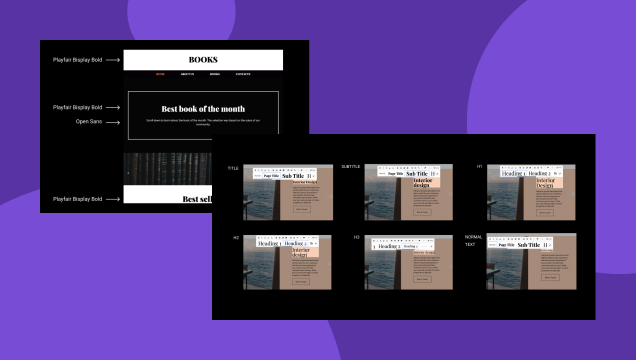
Hierarchy is the order of the text on your website. Most websites, especially text-heavy ones (like blog posts) try to break texts into smaller sections, to make them more digestible and scannable. These sections are known as headings.

Text hierarchy allows the readers to jump through the text, looking at the sections that are more important, or the ones they are looking for. They also allow you to emphasize which parts of the text are critical, while others are secondary information.

In websites, text hierarchy can be emphasized through different fonts, font sizes, colors, or other features. For example, in this article, Web typography terms is a Heading 2 (H2,) while the mentioned terms are Heading 3 (H3.) These H3 sections are increasingly specific, and their look indicates that they are a subsection of a more general topic. The title of the blog is usually Heading 1 (H1.) Here’s an example of text hierarchy showcased in our text editor.

Examples of different types of hierarchy

Try this template

Choosing the Best Font for Reading on Screen

Digital design is evolving rapidly. If only a few years ago there were only a handful of fonts to choose from, now, the selection is in thousands. These fonts have been created for the screen, and come with nuances and details that make them legible on different devices.

This being said, there are a few things you need to consider when choosing a font for your website. They’ll make the reading experience on your website much more pleasant, and ensure a better customer experience.

1. Keep the number of used fonts to a minimum

A good rule is to stick with one or two font families. Going above that number will make your text and web page look unstructured, unprofessional, and sometimes even confusing. The same goes for the font sizes: too many sizes, especially when mixed with each other, can make for a pretty chaotic viewing experience.

Avoid using too many fonts

Once you choose your font families, stick to them throughout the whole website. If you pick two font families, it’s important to make sure that they complement, or at least harmonize each other.

Example of combining two font families

Try this template

Look at the following font combination examples. In the first picture, although the fonts belong to different font families, and seem to be quite different from each other, none of the fonts overshadow the other. The two fonts are in good balance, making for a harmonious combination.

Font combination example

Now let’s take a look at another font pairing. In this example of the Baskerville + Impact combination, Impact vastly overshadows Baskerville. It drives the attention to itself, creating a possibility of the first part of the text being ignored.

Another font combination example

2. Try and stick to standard fonts

There are thousands of fonts available at your disposal through platforms like Google Fonts, and they give exciting opportunities to try something fresh and exciting. However, there is one thing that can go wrong: fonts that are too complicated can distract your website visitors. To avoid this, try sticking with standard fonts unless there is a really special occasion that requires custom-made fonts. Experimenting with fonts is fun, but it’s important to keep in mind that the aim of good typography is to make people read the content.

3. Go with a typeface that looks well on different devices

People will access your website from different devices, ranging from smartphones and tablets to PCs. To ensure that your website remains accessible to the readers, go with fonts that look nice and readable on different screens. Start with using a font that looks nice in different sizes. Roboto font, displayed in the picture below, is one such example.

Example of a Typeface That Looks Well on Different Devices

Try to avoid scripts that are cursive or ornamented. They look very beautiful, but as their size decreases, they become less and less readable, as with the Comforter Brush font below.

Example of a Comforter Brush font

Font Pairing Websites for Your Website

Now, let’s take a look at few gorgeous font pairings that you can use for your website to achieve balanced and beautiful look.

1. Lora & Merriweather

Lora & Merriweather font pairing

Try this template

2. Roboto & Archivo Black

Roboto & Archivo Black font pairing

Try this template

3. Bebas Neue & Old Standard TT

Bebas Neue & Old Standard TT font pairing

Try this template

Conclusion

Armed with these typography tips and know-how, you now have enough knowledge to start experimenting. Play around with the typography of your website to come up with font and style combinations that will both look good and ensure your visitors are having a great experience. If you have the resources, organize a user testing to see how people are reacting to your typography choices. Or simply ask a few friends for feedback. This will give you insights into the readability of your texts, as well as whether they are achieving the desired goal.

Previous
Paddings & Margins Principles
Next
A Beginner’s Guide to Website Composition Principles
© Site.pro 2011. Website Builder. United States.
Contact SalesTerms of ServicePrivacy Policy